
Terma for Mac

Terma is a remote connection workspace for desktop and self-hosted Web environments. It brings SSH, terminals, SFTP, remote desktops, port forwarding, and batch commands into one interface.
Terma — overview
English · 简体中文
Terma
Terma is a remote connection workspace for desktop and self-hosted Web environments. It brings SSH, terminals, SFTP, remote desktops, port forwarding, and batch commands into one interface.
Download the latest release · View release history · GPL-3.0 license
Interface preview
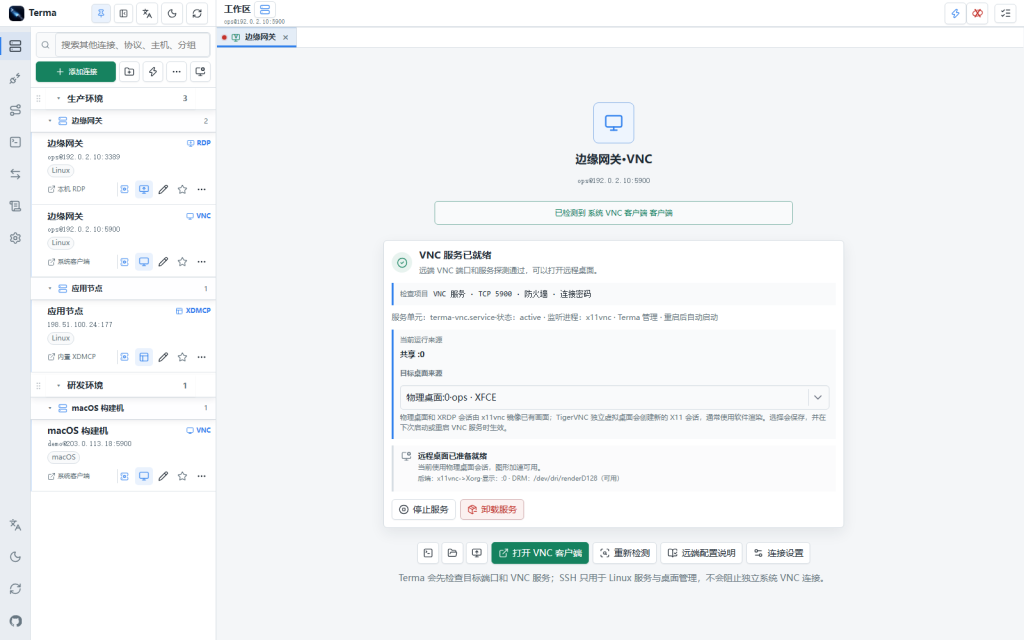
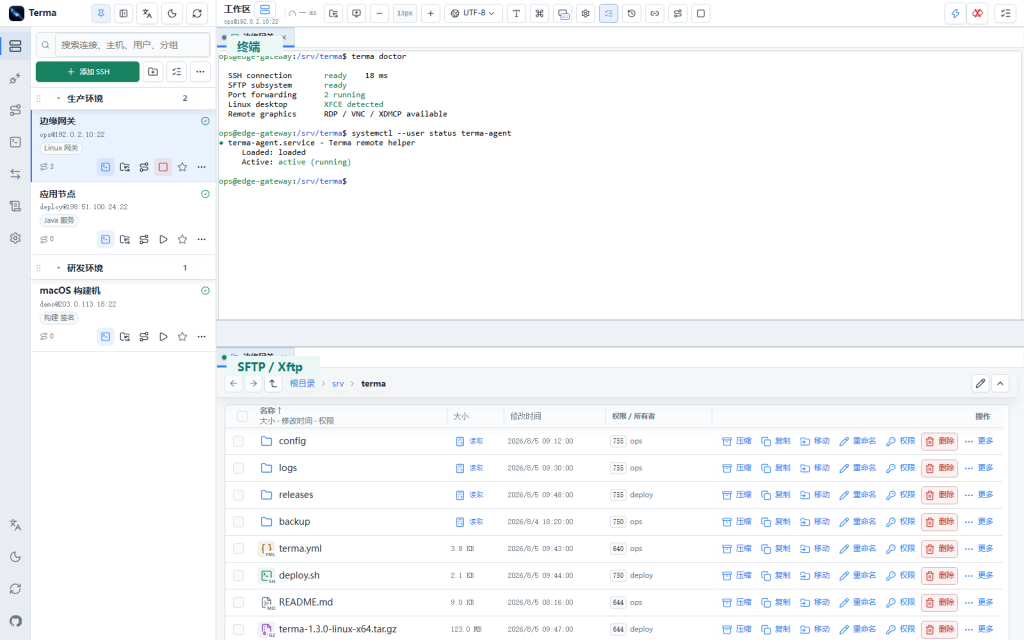
Terminal sessions and runtime diagnostics Remote desktops and other connections
SFTP file management
Browser file sources
Linux desktop management
Port forwarding
Mobile workspace tabs and terminal controls
Highlights One data set powers the Electron desktop app, desktop browsers, and mobile Web access, so connection settings do not need to be maintained twice. SSH connections, terminals, SFTP, tunnels, and batch operations share one multi-tab workspace. Desktop packages are available for Windows, macOS, and Linux; Web mode also runs on Linux servers and Termux, with native x64/ARM64 FPKs for fnOS NAS. Supports private-key and password authentication, encrypted configuration, database backup and restore, and SSH config import/export. Desktop and source runs listen only on loopback by default. LAN access can be protected with a password, session management, and trusted-proxy policies; fnOS requires authentication for every browser session.
Core features
SSH and workspaces Group, search, tag, favorite, sort, batch-edit, and health-check SSH connections, with recent-use tracking. Authenticate with passwords, regular or passphrase-protected private keys, and SSH Agent. Terma can read keys from the user ~/.ssh directory and the runtime data directory, and includes an Ed25519 key-generation and public-key deployment wizard. The first connection displays the SHA-256 host fingerprint for confirmation. Host-key changes produce a prominent warning, and terminals, SFTP, forwarding, and batch commands share the same trust record. Terminals, commands, and forwarding prefer the built-in SSH implementation and fall back to system OpenSSH for compatible OpenSSH-only settings. Structured timeouts, keepalives, and one-hop jump hosts are supported. The lightning button and Ctrl+K open a global quick panel for connections, tags, named workspaces, command snippets, and common actions. Snippets support variables, favorites, import/export, terminal insertion, and confirmed batch execution. Multi-tab workspaces support pinned tabs, recently closed recovery, and recursive desktop splits. Composition mode can be opened from a tab or the empty tab-bar area; use the left mouse button or Ctrl/Cmd to select tabs for an independent workspace and drag to reorder workspaces. Each workspace keeps its own tabs and split layout and can be saved as a searchable, previewable, repairable, importable, and exportable named preset. Inspect basic server information, runtime status, and listening ports.
Details
产品简介
Terma 是一个面向桌面端和自托管 Web 的远程连接工作台。它把 SSH 连接、终端、SFTP、远程桌面、端口转发和批量运维放进一个多标签工作区。
适合谁
- 需要同时维护多台 Linux 或 Windows 主机的开发者和运维人员。
- 希望把连接配置、终端标签和文件操作放在同一工作区的团队。
- 需要在桌面端、浏览器或局域网设备之间切换的个人用户。
核心能力
SSH 与连接管理
支持密码、普通或加密私钥、SSH Agent 和单级跳板机。连接可分组、搜索、收藏、排序并执行健康检查;首次连接会显示 SHA-256 主机指纹供确认。
多协议工作区
除 SSH 外,还可管理 SFTP、FTP/FTPS、RDP、VNC、X11/XDMCP、Telnet、串口和端口转发。不同协议使用独立入口,但可以围绕同一台服务器组织标签。
一套数据,多种入口
桌面端是 Electron 对 Web UI 和 Node.js 服务的容器,浏览器和移动端 Web 使用相同的数据结构与连接能力。
平台支持
| 平台 | 桌面端 | Web 模式 |
|---|---|---|
| Windows 10/11 | 支持 | 支持 |
| macOS | 支持 | 支持 |
| Linux | 支持 | 支持 |
| Termux / 无图形 Linux | 不建议 | 支持 |
| 飞牛 fnOS(x64 / ARM64) | 不提供 | 支持 |
How to install Terma
- Open Terminal (press ⌘ + Space and type “Terminal”).
- If Homebrew is not installed yet, run the command below first.
- Run this command:
Latest 10 releases
Last updated 2026-10-17; current version v1.8.1, with the latest 10 releases listed.
| Version | Released | Type | Size | macOS | Windows | Linux |
|---|---|---|---|---|---|---|
| v1.8.1 | 2026-10-17 | Stable | 157.6 MB | Download | Download | Download |
| v1.8.0 | 2026-10-17 | Stable | 157.4 MB | Download | Download | Download |
| v1.7.10 | 2026-10-17 | Stable | 157.6 MB | Download | Download | Download |
| v1.7.9 | 2026-10-15 | Stable | 157.6 MB | Download | Download | Download |
| v1.7.8 | 2026-10-11 | Stable | 156.5 MB | Download | Download | Download |
| v1.7.7 | 2026-10-10 | Stable | 157.6 MB | Download | Download | Download |
| v1.7.6 | 2026-10-09 | Stable | 143.6 MB | Download | Download | Download |
| v1.7.5 | 2026-09-21 | Stable | 143.6 MB | Download | Download | Download |
| v1.7.4 | 2026-09-20 | Stable | 143.6 MB | Download | Download | Download |
| v1.7.3 | 2026-09-17 | Stable | 143.6 MB | Download | Download | Download |
Data from GitHub Releases; stable releases first, each group sorted newest first.
Compared with similar apps
Only public metadata is compared, with no subjective recommendation; see the compare pages for field-by-field comparisons.
| App | Version | License | Architecture | 30-day installs |
|---|---|---|---|---|
| Terma | v1.8.1 | GPL-3.0 | Universal binary | 0 |
| sevenzip | 26.06 | LGPL-2.1-or-later AND BSD-3-Clause | CLI | 26,059 |
| p7zip | v17.05 | LGPL-2.1-or-later AND GPL-2.0-or-later | CLI | 11,959 |
| Stats | v3.0.26 | — | Universal binary | 11,937 |
Similar apps: System & Utilities

sevenzip
7-Zip is a file archiver with a high compression ratiop7zip
p7zip-zstd The original intention of p7zip is to make 7z run on unix-like systems.Stats
macOS system monitor in your menu barVorssaint
One menu bar icon doing the job of a dozen paid Mac apps. Install only what you use.Rectangle
Rectangle is a window management app for macOS based on Spectacle.Hammerspoon
This is a tool for powerful automation of OS X. At its core, Hammerspoon is just a bridge…Categories: System & Utilities