
MacTools for Mac

MacTools — a macOS app available via Homebrew.
MacTools — overview
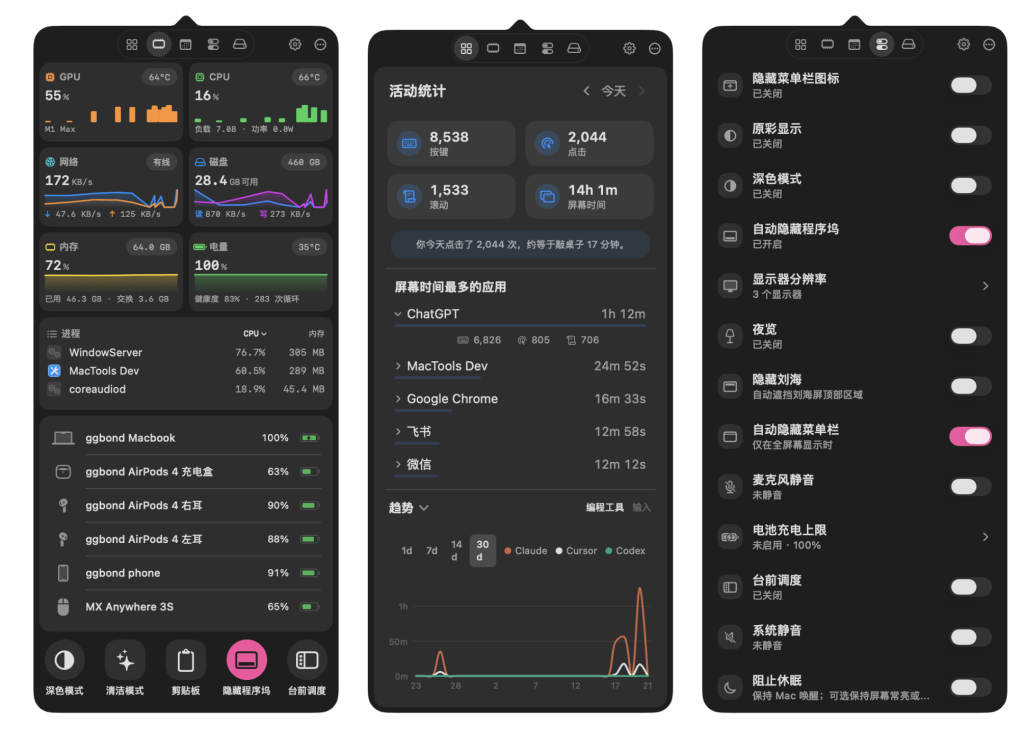
Your Mac's everyday tools, right in the menu bar. Free, open source, and native to macOS. Build your own panels, connect actions, and add the tools you need. English · 简体中文
Website · Download · Documentation · Feedback
https://github.com/user-attachments/assets/7ddba190-de41-4200-8c31-751f9cfb4a2e
Install
Or download the app from GitHub Releases. Requires macOS 14 or later; some plugins need newer macOS versions or compatible hardware.
Open MacTools, choose plugins in Settings → Marketplace, then arrange your menu bar panels. Permissions are requested as needed.
Plugin shortcut settings use the same separate section headings and native cards as other settings, without empty-section gaps or redundant navigation buttons.
Custom settings workspaces use adaptive system backgrounds that coordinate with native settings cards. Search fields, inset previews, and selected controls retain distinct visual roles in light and dark appearance.
System Status settings use subtle metric row separators, aligned controls, and a two-line metric header in narrow windows to keep names and value assignments readable.
Updates and Nightly builds
MacTools checks for app updates automatically. With Homebrew:
Try development features with MacTools-Nightly.dmg from a nightly-* prerelease. Nightly has separate preferences and plugins and can coexist with the stable app. It is intended for testing; hardware controls still affect the same Mac.
Make it yours
Custom panels Mix live widgets, quick controls, and feature rows. Drag to rearrange them, move them between panels, and choose each panel's icon. More and editing menus open on the first click from a background app; detail panels stay open during internal focus changes.
Custom themes Choose built-in palettes or import iTerm2 and Base16/Base24 themes. Set light and dark themes separately, choose system glass or solid floating panels, and personalize the menu bar icon with images or animations.
Automation & workflows Chain actions with delays and failure handling. Trigger workflows by schedule, calendar events, apps, power, displays, or network changes, and review their run history.
A growing plugin marketplace Browse dozens of plugins for productivity, displays, audio, cleanup, and monitoring. Install and update the ones you need, with settings and shortcuts in one place.
Get to any action quickly
Search actions, settings, workflows, and plugins from the Command Palette. Press ⌘K within MacTools, or assign a global shortcut to open it from anywhere. Use Action Grid, keyboard shortcuts, mouse mappings, or trackpad gestures for frequent actions; connect Apple Shortcuts, saved scripts, and Run Links to your setup.
Details
MacTools 把显示器、清理、休眠、启动台、插件市场和更多高频动作集中到一个轻量入口。
How to install MacTools
- Open Terminal (press ⌘ + Space and type “Terminal”).
- If Homebrew is not installed yet, run the command below first.
- Run this command:
Latest 10 releases
Last updated 2026-11-02; current version v2.2.0, with the latest 10 releases listed.
| Version | Released | Type | Size | macOS | Windows | Linux |
|---|---|---|---|---|---|---|
| v2.2.0 | 2026-11-02 | Stable | 13.9 MB | Download | Download | — |
| plugins-2.2.0 | 2026-11-02 | Stable | 13.9 MB | Download | Download | — |
| v2.1.0 | 2026-10-23 | Stable | 13.9 MB | Download | — | — |
| plugins-2.1.0 | 2026-10-23 | Stable | 732 KB | Download | — | — |
| nightly-90-1 | 2026-11-07 | Pre-release | 14.2 MB | Download | — | — |
| nightly-89-1 | 2026-11-06 | Pre-release | 14.2 MB | Download | — | — |
| nightly-85-1 | 2026-11-03 | Pre-release | 14.2 MB | Download | — | — |
| nightly-83-1 | 2026-10-31 | Pre-release | 14.1 MB | Download | — | — |
| nightly-82-1 | 2026-10-30 | Pre-release | 13.9 MB | Download | — | — |
| nightly-81-1 | 2026-10-29 | Pre-release | 14.0 MB | Download | — | — |
Data from GitHub Releases; stable releases first, each group sorted newest first.
Supported systems
- macOS 27(Golden Gate) (Apple silicon + Intel)
- macOS 26 Tahoe (Apple silicon + Intel)
- macOS 15 Sequoia (Apple silicon + Intel)
- macOS 14 Sonoma (Apple silicon + Intel)
Compared with similar apps
Only public metadata is compared, with no subjective recommendation; see the compare pages for field-by-field comparisons.
| App | Version | License | Architecture | 30-day installs |
|---|---|---|---|---|
| MacTools | v2.2.0 | GPL-3.0 | Universal binary | 177 |
| xbar | v2.1.7-beta | — | Universal binary | 153 |
| Doll | v0.0.9.2 | — | Universal binary | 201 |
| WhichSpace | v1.4.3 | — | Universal binary | 159 |
Similar apps: System & Utilities

xbar
xbar (the BitBar reboot) lets you put the output from any script/program in your macOS menu bar.
Doll
Doll is a Mac app that help you catch up important messages!
WhichSpace
Have you ever forgotten which space is currently active on macOS and wanted a quick way to…
sevenzip
7-Zip is a file archiver with a high compression ratiop7zip
p7zip-zstd The original intention of p7zip is to make 7z run on unix-like systems.Stats
macOS system monitor in your menu barCategories: System & Utilities