
System Data Unpacked for Mac

A Mac app, in a window or in the menu bar, that shows what is really inside macOS "System Data" and lets you delete it, item by item. macos-sysdata.yigitech.dev
System Data Unpacked — overview
A Mac app, in a window or in the menu bar, that shows what is really inside macOS "System Data" and lets you delete it, item by item. macos-sysdata.yigitech.dev
Open System Settings > General > Storage on a developer Mac and "System Data" is often the largest line, with no way to see inside it. Finder puts everything it cannot attribute to an app, photos or documents in that bucket: simulator runtimes, Xcode symbol caches, package-manager stores, virtual machine disks, the unified log, per-app data folders.
This app opens the bucket. It is not a cache cleaner: ~/Library/Caches is one small line among fifty, and the app never deletes anything you did not click.
To understand it before installing anything, the
explains what fills it, how to see each part from Terminal, and what is safe to clear, with the measurements behind this app.
Every release is listed in CHANGELOG.md, including the two that shipped a broken updater and what to do if you are on one of them. There is a short tour at macos-sysdata.yigitech.dev, and contributions are described in CONTRIBUTING.md.
Up to 1.0.4 the app was called SysDataMenu. The bundle identifier, the Homebrew cask and the command-line binary kept their names, so Full Disk Access, your settings and any scripts carry over without reinstalling.
Install
Or download the disk image, open it and drag the app onto Applications. Every release carries the same image as SysDataMenu-.dmg. A .zip of the same app is attached to every release for anyone scripting the download.
If the app is already in Applications from the disk image, brew install stops with "It seems there is already an App". Hand the existing copy to Homebrew instead:
Releases from 0.3.2 on are signed with a Developer ID and notarized by Apple, so the app opens without a Gatekeeper prompt. From 0.3.7 the binary is universal; 0.3.2 to 0.3.6 were Apple Silicon only and will not launch on an Intel Mac.
Build from source (Xcode 16 or later):
The app has a Launch at login switch in its footer.
Updates
The app can check GitHub once a day for a newer release and offer to install it. It is off by default, and it is the only network request the app makes: with the switch off, nothing leaves the Mac.
Installing replaces the app in place. Before anything is moved, the download must have come from github.com over HTTPS, pass the same Gatekeeper assessment a fresh download gets, and be signed by the same team as the copy asking for the update. Anything else is discarded with a message, and the installed app is left alone.
Uninstall
--zap is the part that matters: without it the app goes and its files stay.
If it was installed by dragging the disk image, drag the app to the Trash and remove the four things it leaves behind:
Details
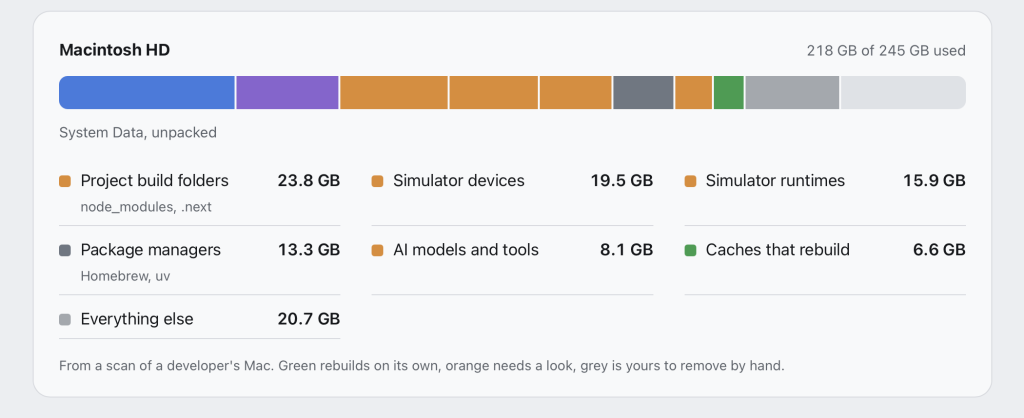
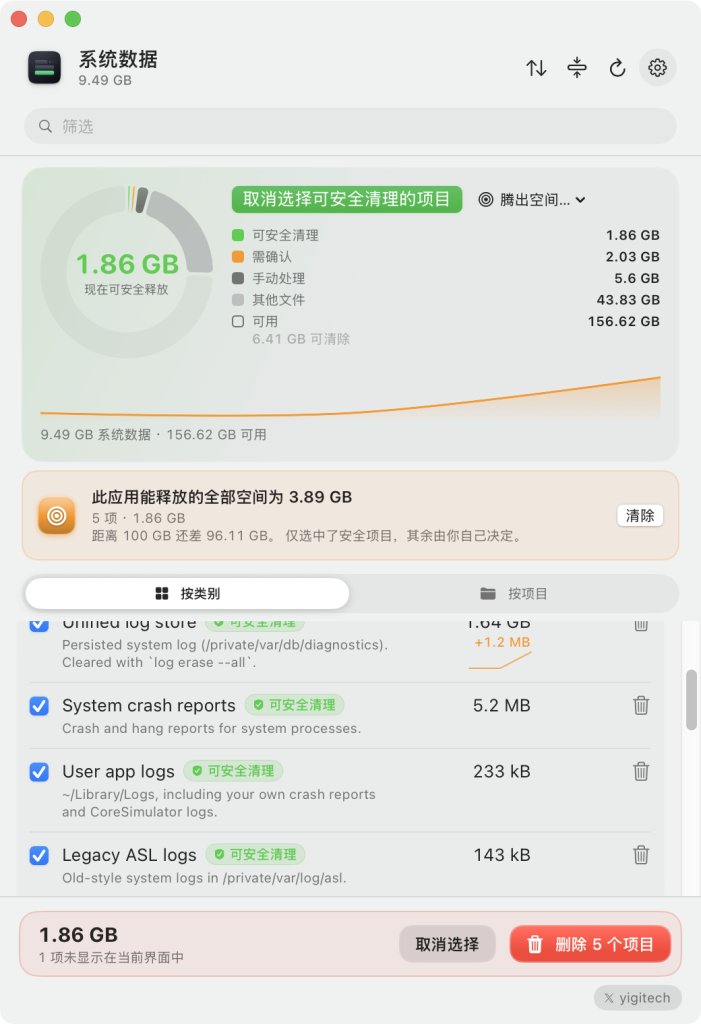
System Data Unpacked 开源 macOS 工具(免费、由 Apple 签名并公证、要求 macOS 14 及以上)的官网。它要解决的问题是:macOS 的“存储空间”设置会把所有无法归类的文件塞进一根灰色条,统一标为“系统数据”(System Data)。这款应用则把这根灰色条对应的内容拆开来看:模拟器、Xcode 构建产物、包管理器缓存、AI 模型、备份等,并允许你逐项删除,或者在不删除文件的前提下把文件夹压缩变小;每一处操作都会先展示将要执行的命令。
演示数据(取自一位开发者的 Mac):磁盘容量 245 GB,已用 218 GB,其中系统数据占 107.9 GB,拆开来看:项目构建目录(node_modules、.next)23.8 GB、模拟器设备 19.5 GB、模拟器运行时 15.9 GB、包管理器(Homebrew、uv)13.3 GB、AI 模型与工具 8.1 GB、可重建的缓存 6.6 GB、其他 20.7 GB。
安装方式:从 GitHub Releases 下载 DMG,或执行 brew install –cask jarvis322/tap/sysdata。
三档安全标签
Safe:缓存、构建产物、日志,删除它们之后系统会自动重建,代价只是一次重建。
Review:值得先看一眼再决定,例如装有 App 的模拟器、你下载的模型。默认移到废纸篓,也可以选择立即永久删除。
Manual:不归这款应用处理,例如 Homebrew 安装项、本地快照;这类项目会给出精确的命令,让你自己执行。
“保留但缩小一半”:有些东西你不想删,例如 SDK、Xcode 归档、以后还会回来的项目。压缩(Shrink)功能会按 macOS 自有的方式,把同样的文件压缩存储起来,并且就地替换,相关目录和原先一样可以直接打开。举一个实测例子:一个 node_modules(22,241 个文件)从 454 MB 变成 224 MB。前提是压缩后文件仍会长期留在那里;共享文件的目录(如 pnpm 的硬链接)会被跳过,因为压缩这类目录反而会更占空间。压缩过程会先在旁边写入一份压缩副本,校验通过后再一次性替换;一旦出错,原目录保持不变。
主要功能:整个磁盘都集中在一个窗口里展示,并以环形图呈现,同时给出各类别的历史趋势。
可以反向指定要腾出的空间量,例如指定 20 GB,应用会自动挑出最少需要担心的项目并选中它们。
以“项目”为单位而不是以“文件夹”为单位汇总:把 node_modules、构建产物、DerivedData、Docker 镜像都归到同一个项目下,可以一键归档,源文件不会被碰。
用趋势图解释空间为什么会增长,并提示某个类别异常增长以及背后的具体项目。
单独列出 Ollama、Hugging Face 的模型,计算大小时不会重复计算共享层。
删除前先把要处理的项目逐项列清楚,包括大小和标签;可以选择移到废纸篓,也可以选择立即删除。
可选的 Touch ID、Apple Watch 或密码二次确认。
可选扫描外接硬盘;Time Machine 盘和网络共享永不被遍历。
完全本地运行,没有账号也没有分析统计;唯一可能的网络请求是检查更新,且默认关闭。
支持脚本化:–json 输出清单、–clean 预览每周清理、–clean –apply 执行清理,还支持快捷指令和桌面小组件。
能识别的对象:模拟器和运行时、Xcode DerivedData 与归档、npm/pnpm/yarn/Cargo/uv/pip/Homebrew 缓存、Ollama/Hugging Face/LM Studio 模型、Claude Code/Codex/Gemini 数据、Docker 镜像与虚拟磁盘、iOS 备份、Time Machine 本地快照、日志与临时文件、项目构建目录、Android SDK 与模拟器、JetBrains 缓存、Unity、Logic Pro/GarageBand 音色库、WhatsApp 聊天与媒体,以及其他体积较大但无法归类的项。
关于“系统数据”:站点另有一篇完整指南,解释“系统数据”到底是什么、真机上是哪些内容把它占满的、用哪些终端命令查看各部分,以及哪些可以安全清理。页面以 FAQ 的形式覆盖了以下几个问题:这是什么、为什么这么大、能不能删、怎么清理、能否不删就腾空间、为什么要“完全磁盘访问”权限。
一句话:把 macOS 那根说不清道不明的“系统数据”灰条拆成可看、可管、可安全回收的明细,并额外提供“压缩而非删除”的省钱方案。
How to install System Data Unpacked
- Open Terminal (press ⌘ + Space and type “Terminal”).
- If Homebrew is not installed yet, run the command below first.
- Run this command:
Latest 10 releases
Last updated 2026-11-12; current version v1.13.1, with the latest 10 releases listed.
| Version | Released | Type | Size | macOS | Windows | Linux |
|---|---|---|---|---|---|---|
| v1.13.1 | 2026-11-12 | Stable | 8.4 MB | Download | — | — |
| v1.13.0 | 2026-11-12 | Stable | 8.4 MB | Download | — | — |
| v1.12.0 | 2026-11-12 | Stable | 8.4 MB | Download | — | — |
| v1.11.3 | 2026-11-06 | Stable | 8.3 MB | Download | — | — |
| v1.11.2 | 2026-11-06 | Stable | 8.3 MB | Download | — | — |
| v1.11.1 | 2026-11-02 | Stable | 8.3 MB | Download | — | — |
| v1.11.0 | 2026-11-02 | Stable | 8.3 MB | Download | — | — |
| v1.10.0 | 2026-10-23 | Stable | 8.0 MB | Download | — | — |
| v1.9.0 | 2026-10-14 | Stable | 7.9 MB | Download | — | — |
| v1.8.0 | 2026-10-14 | Stable | 7.5 MB | Download | — | — |
Data from GitHub Releases; stable releases first, each group sorted newest first.
Compared with similar apps
Only public metadata is compared, with no subjective recommendation; see the compare pages for field-by-field comparisons.
| App | Version | License | Architecture | 30-day installs |
|---|---|---|---|---|
| System Data Unpacked | v1.13.1 | — | Universal binary | 0 |
| sevenzip | 26.06 | LGPL-2.1-or-later AND BSD-3-Clause | CLI | 26,059 |
| p7zip | v17.05 | LGPL-2.1-or-later AND GPL-2.0-or-later | CLI | 11,959 |
| Stats | v3.0.26 | — | Universal binary | 11,937 |
Similar apps: System & Utilities

sevenzip
7-Zip is a file archiver with a high compression ratiop7zip
p7zip-zstd The original intention of p7zip is to make 7z run on unix-like systems.Stats
macOS system monitor in your menu barVorssaint
One menu bar icon doing the job of a dozen paid Mac apps. Install only what you use.Rectangle
Rectangle is a window management app for macOS based on Spectacle.Hammerspoon
This is a tool for powerful automation of OS X. At its core, Hammerspoon is just a bridge…Categories: System & Utilities