
RemoveMacAI for Mac

Turn off Apple Intelligence and delete its models. The app starts with just that.
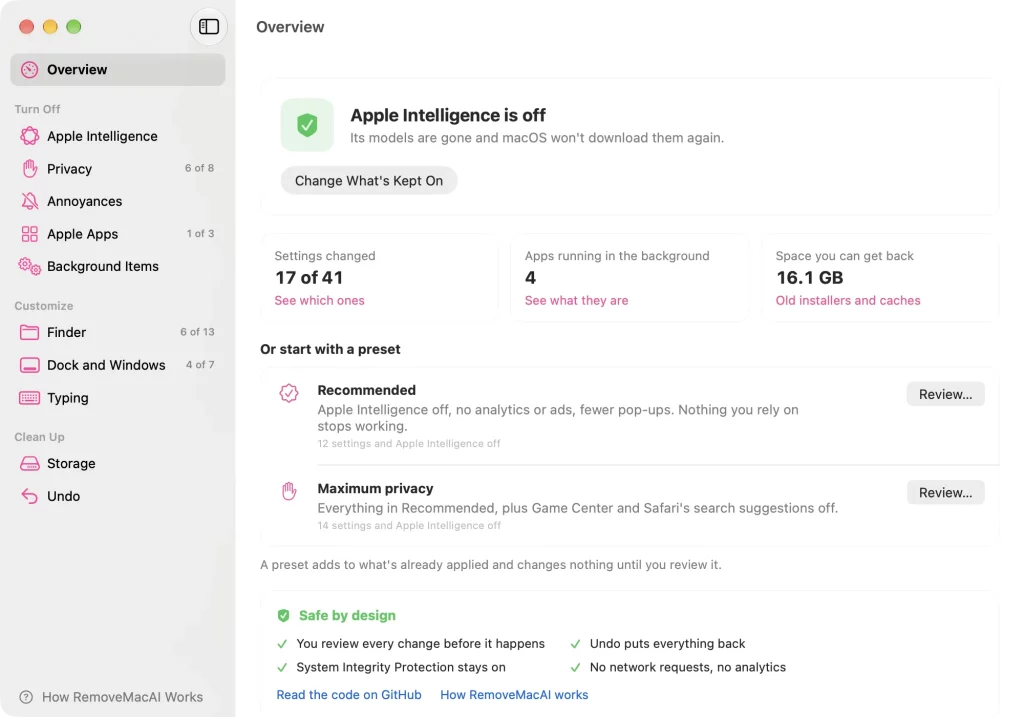
RemoveMacAI — overview
Turn off Apple Intelligence and delete its models. The app starts with just that. If you want to debloat further, it can also stop the analytics and ads, quiet the pop-ups, switch off other apps' background updaters and get disk space back. You see every change before it happens, and every change can be undone.
omlahore.github.io/RemoveMacAI
Built on pared by 4evy, who did the hard work first: mapping Apple's asset service, the model sets and the settings keys the Apple Intelligence part relies on.
The Verge, Ars Technica, The Register, MacRumors, AppleInsider and Help Net Security have written about RemoveMacAI, and Daring Fireball linked to it.
Install
The app
Open Terminal (Applications > Utilities), paste this line and press Return:
It downloads the latest release, checks its SHA-256 checksum, puts RemoveMacAI in Applications and opens it.
To download it yourself instead, get RemoveMacAI.zip from the latest release, unzip it and drag RemoveMacAI to Applications. The app is not notarized, so the first time you open it macOS says it can't verify it. Open System Settings > Privacy & Security, scroll down and click Open Anyway.
The command line
This runs the command-line version from a temporary folder and installs nothing. With Homebrew:
The app and the command line are the same program and share the same undo history. If you installed the app from the zip, choose RemoveMacAI > Install Command Line Tool… to get the removemacai command too.
What it does
The app opens on Apple Intelligence alone. Show More Tools in the sidebar brings in the rest.
Two presets get you started. Recommended turns Apple Intelligence, analytics and ads off and removes the pop-ups, and leaves alone anything you rely on. Maximum privacy adds Game Center and Safari's search suggestions. Both add to what is already applied, and nothing changes until you review it.
Command line
apply, undo, background and clean show the change first and ask. --dry-run shows it and stops, and --yes skips the question.
Tab completion for zsh, bash and fish is in completions. Each script says where it goes.
Demo video
For Mac admins
removemacai export writes the same configuration profile the app installs, so you can deploy it with Jamf, Kandji, Intune or any other MDM:
It holds the Apple Intelligence restrictions, the download block for removed models and the locked tweaks. Per-user tweaks such as Finder and Dock settings aren't in the profile; removemacai apply sets those on each Mac. removemacai tweaks --json reports the state of every tweak for compliance scripts.
iPhone and iPad
export --for iphone or export --for ipad writes a profile for that device:
An unsupervised phone only honors the Siri and ChatGPT switches.
Details
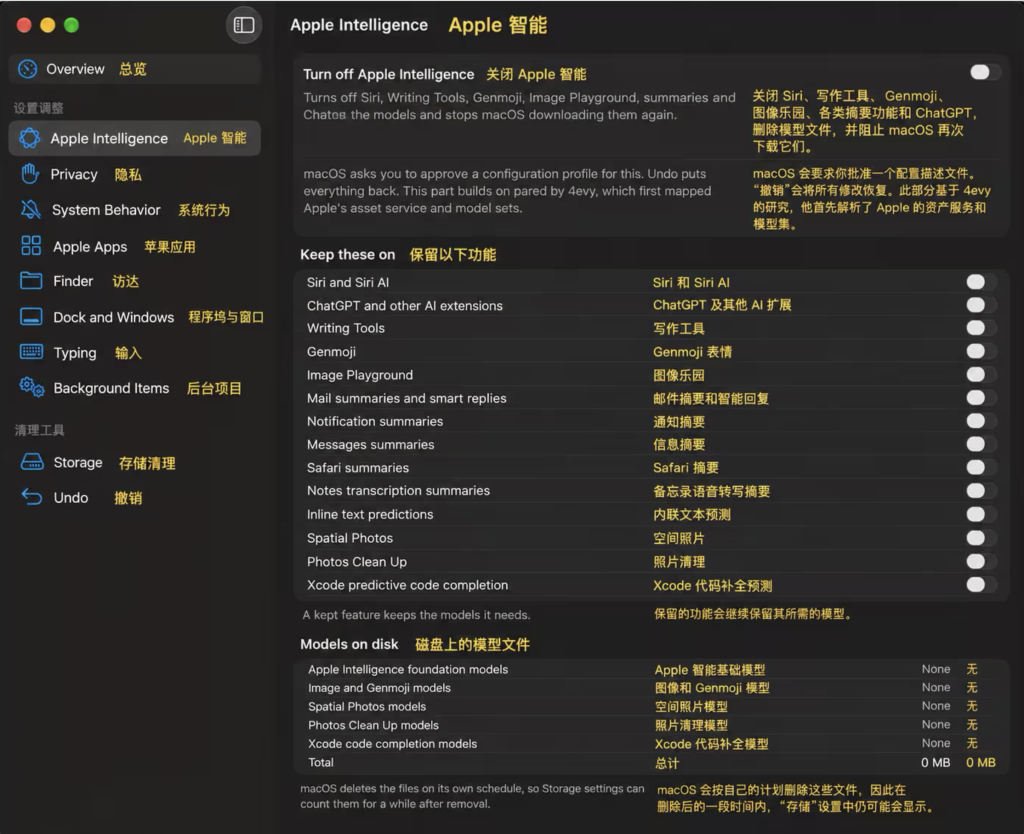
按需关闭你不要的功能即可:
- Siri 与 Siri AI
- ChatGPT 及其他 AI 扩展
- 写作工具(Writing Tools)
- Genmoji
- Image Playground
- 邮件摘要与智能回复
- 通知摘要
- 信息摘要
- Safari 摘要
- 备忘录转录摘要
- 内联文本预测
- 空间照片(Spatial Photos)
- 照片清理(Photos Clean Up)
- Xcode 预测代码补全
-
精简 macOS 27 系统
RemoveMacAI 能扫描出系统中的其他垃圾文件,包括缓存、视频壁纸、未使用的模拟器等文件:
-
RemoveMacAI 还能精简以下内容:
- 隐私
- 关闭 Mac 分析数据
- 关闭个性化广告
- 关闭“改进 Siri 与听写”
- 关闭“改进搜索”
- 关闭 Spotlight 网络搜索结果
- 关闭“查询”网络建议
- 关闭 Safari 搜索建议
- 关闭 Game Center
- 系统行为
- 关闭点击桌面壁纸时隐藏所有窗口
- 隐藏桌面小组件
- 阻止播放键自动打开“音乐”
- 关闭 iPhone 镜像
- Apple 应用
- 关闭“音乐”中的 Apple Music 服务
- 关闭“图书”中的 Book Store
- 从 Dock 移除 News、TV、Music、Podcasts、Books、Freeform、Maps、Stocks 等 Apple 应用图标
- Finder
- 显示文件扩展名
- 显示隐藏文件
- 显示路径栏
- 显示状态栏
- 文件夹优先排列
- 默认搜索当前文件夹
- 关闭修改扩展名确认提示
- 在标题栏显示完整路径
- 禁止在网络磁盘写入
.DS_Store - 30 天后自动清空废纸篓
- 默认保存到本机而非 iCloud
- 展开保存对话框
- 显示
~/Library
- Dock 与窗口
- 隐藏 Dock 最近使用的应用
- 去掉 Dock 自动隐藏延迟
- 关闭 Dock 图标弹跳
- 将最小化窗口收进应用图标
- 关闭窗口打开动画
- 去掉平铺窗口之间的间隙
- 去掉窗口截图阴影
- 输入
- 关闭自动纠错
- 关闭智能引号和智能破折号
- 关闭双空格自动句号
- 关闭自动首字母大写
- 长按按键改为重复输入,不弹重音字符菜单
- 后台项目
- 查看第三方 App 安装的 updater / helper
- 单独关闭或恢复这些后台项目
- 存储清理
- 删除旧 macOS 安装器
- 删除动态航拍壁纸视频
- 删除 iPhone / iPad 固件更新文件
- 清理 Xcode DerivedData
- 清理 Xcode Device Support
- 删除失效 Simulator
- 清理第三方 App 缓存
- 删除 Time Machine 本地快照
- 卸载 GarageBand、iMovie、Keynote、Numbers、Pages 等可选 Apple 应用
- 隐私
How to install RemoveMacAI
- Open Terminal (press ⌘ + Space and type “Terminal”).
- If Homebrew is not installed yet, run the command below first.
- Run this command:
Latest 10 releases
Last updated 2026-10-18; current version v1.1.4, with the latest 10 releases listed.
| Version | Released | Type | Size | macOS | Windows | Linux |
|---|---|---|---|---|---|---|
| v1.1.4 | 2026-10-18 | Stable | 690 KB | Download | — | — |
| v1.1.3 | 2026-10-17 | Stable | 689 KB | Download | — | — |
| v1.1.2 | 2026-10-17 | Stable | 686 KB | Download | — | — |
| v1.1.1 | 2026-10-16 | Stable | 685 KB | Download | — | — |
| v1.1.0 | 2026-10-11 | Stable | 684 KB | Download | — | — |
| v1.0.3 | 2026-10-09 | Stable | 526 KB | Download | — | — |
| v1.0.2 | 2026-10-08 | Stable | 512 KB | Download | — | — |
| v1.0.1 | 2026-10-07 | Stable | 511 KB | Download | — | — |
| v1.0.0 | 2026-10-06 | Stable | 489 KB | Download | — | — |
| v1.2.0-beta.1 | 2026-10-18 | Pre-release | 693 KB | Download | — | — |
Data from GitHub Releases; stable releases first, each group sorted newest first.
Compared with similar apps
Only public metadata is compared, with no subjective recommendation; see the compare pages for field-by-field comparisons.
| App | Version | License | Architecture | 30-day installs |
|---|---|---|---|---|
| RemoveMacAI | v1.1.4 | MIT | Universal binary | 0 |
| Codex | rust-v0.169.0 | — | Universal binary | 417,825 |
| ollama | v0.40.16 | MIT | CLI | 63,182 |
| Claude Code | 2.1.308 | — | Universal binary | 60,329 |
Similar apps: AI & Machine Learning

Codex
Codex CLI is a coding agent from OpenAI that runs locally on your computer.
ollama
Create, run, and share large language models (LLMs)Claude Code
Claude Code is an AI programming assistant from Anthropic that turns the terminal and IDE into…llama.cpp
ggml / ops / maintainer PRs%20sort%3Aupdated-desc) / dev stats / lib llama API / llama-server…
ggml
Tensor library for machine learningrtk
CLI proxy to minimize LLM token consumptionCategories: AI & Machine Learning