
oryxis for Mac

A modern SSH client built entirely in Rust. Fast, encrypted, native.
oryxis — overview
A modern SSH client built entirely in Rust. Fast, encrypted, native.
What is Oryxis?
Oryxis is an open-source alternative to Termius: a desktop SSH client with a modern UI, an encrypted local vault for credentials, and no cloud account anywhere in the loop. No Electron, no webview, no vendor servers. Just a single native binary.
Most SSH clients make you pick two out of three: powerful but dated (PuTTY), pretty but Electron-heavy (Termius, Tabby), or minimal and terminal-only (OpenSSH). Oryxis aims at all three: beautiful, fast, and native.
Install
Windows
or, from a terminal:
Arch Linux (AUR)
Direct downloads from the latest release:
Which Windows installer? (system vs per-user, VSCode-style) System (oryxis-setup-.exe): installs to Program Files, registers under HKLM, requires UAC. Use this for shared machines or when all Windows users should share the install. This is the build winget install targets. Per-user (oryxis-user-setup-.exe): installs to %LOCALAPPDATA%ProgramsOryxis, registers under HKCU, no admin rights. Use this on locked-down machines or when you don't want UAC prompts on every update.
Both register oryxis and oryxis-mcp on PATH so they resolve from any shell. The auto-updater detects the install scope and downloads the matching installer. Windows binaries are Authenticode-signed (see Code signing policy). Portable (oryxis-windows-*.zip): unzip anywhere (a USB key) and run oryxis.exe; the auto-updater replaces the exe in place. A new copy keeps everything (device settings, the vault list, the vaults, plugins, logs) in a data folder it creates next to oryxis.exe, so the folder travels with it. On a computer where Oryxis already keeps its data in %USERPROFILE%.oryxis, the copy keeps using that: create the data folder yourself to switch, and copy the contents of %USERPROFILE%.oryxis into it to bring the setup along (nothing is moved for you). A vault opened from another drive (a VeraCrypt volume) stays where it is; vaults and folders on the USB key itself are remembered relative to the data folder, so another drive letter does not break them. Biometric unlock, the MCP client configs and the oryxis:// link registration belong to each computer. On Linux and macOS the same works by creating an oryxis-data folder next to the binary, the .AppImage file or Oryxis.app (named after the app because those usually sit in a shared folder).
Highlights Native and fast. Pure Rust, GPU-accelerated iced UI, single binary. No Electron, no webview. Encrypted local vault. Argon2id + ChaCha20-Poly1305 per field, optional master password, biometric unlock (Windows Hello / Touch ID / Linux keyring), idle auto-lock, TOTP autofill for 2FA hosts, and stored passwords offered at sudo prompts (never sent on their own). Several vaults. Keep Work and Personal in separate encrypted files, each with its own master password, settings, sync and MCP exposure, open at once: every window works on one vault and switches
Details
- 原生且快速:纯 Rust、GPU 加速的 iced 界面、 单一二进制。没有 Electron。
- 本地加密保险库:Argon2id + ChaCha20-Poly1305 字段级加密,可选 主密码、生物识别解锁(Windows Hello / Touch ID / Linux 密钥环)、 闲置自动锁定、TOTP 两步验证自动填充,以及在
sudo提示处 提供保险库密码(绝不自动发送)。 - 多个保险库:把工作与个人分别放进各自加密的文件,每个都有自己的 主密码、设置、同步和 MCP 暴露范围,并且可以同时打开:每个窗口使用 一个保险库,可从主页标签、每个保险库的快捷键或命令面板原地切换, 另一个保险库的标签页照常运行。两个保险库从不共用密钥。
- 完整的 SSH 能力:自动认证、多级跳板机、SOCKS / HTTP / 命令代理、 Agent 转发、独立的
-L/-R/-D端口转发、面向菜单式堡垒机 (JumpServer 等)的 expect/send 登录脚本。 - 原生支持安全密钥:YubiKey 或任何 FIDO2 令牌都能直接在应用内为
sk-ssh-ed25519/sk-ecdsa-sha2-nistp256登录签名,支持 Windows、 Linux 与 macOS(含 Windows Hello);触摸与 PIN 都在你的屏幕上询问, 提供仅限硬件的安全密钥认证方式,中间不经过任何外部 Agent。 - 带上你的主机:一次导入即可读取你已有的配置:
~/.ssh/config、 PuTTY、KiTTY、WinSCP、mRemoteNG、MobaXterm、SecureCRT、Xshell、 FinalShell、Termius 或任意 CSV。选择文件(或会话文件夹),格式会 自动识别,编辑后的主机 CSV 导出文件会作为更新、删除和文件夹导回。 - 离线模式,由你决定:一个开关,首次启动和设置中都提供,打开后 Oryxis 不会自行发起任何请求:不检查更新,不下载字体或插件。你自己 配置的内容照常工作。对于从未联网的机器,每个版本旁都附带一个离线包, 插件与字体包已内置,开关也已预先打开。
- 不止 SSH:Telnet 与串口控制台、面向控制台服务器的裸 TCP 连接、 ZMODEM 传输、本地 Shell,以及通过 SSH 隧道一键 RDP/VNC。
- 能扛住网络变化的会话:为主机开启 mosh,Shell 就能挺过休眠、 切换 Wi-Fi 与更换地址;界面会直接告诉你链路已经多久没有联系, 而不是假装一切正常。原生 Rust 客户端,说的是官方
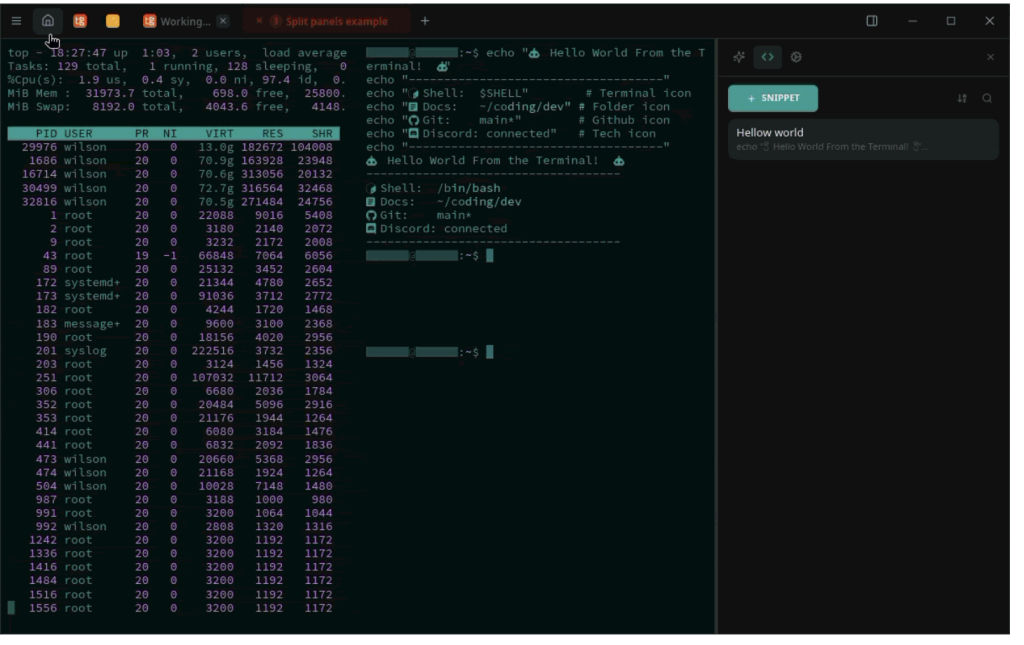
mosh-server的协议,本机无需额外安装任何东西。 - 真正的终端:基于 alacritty 的仿真器、分屏、会话组、按主机主题、 可选的半透明背景或背景图片、内置 Nerd 字体外加可下载字体包 (JetBrains Mono、Fira Code、MesloLGS 等)、标记长时间运行命令的 智能标签页、输入时即可提示的按主机命令历史、形状由你选择的光标, 以及按主机设置的东亚歧义宽度,让 CJK 的 TUI 界面对齐。
- 按顺序运行的代码片段:一个代码片段可以输入命令、等待命令结束或 输出中出现某一行、复制或保存命令打印的内容,还能调用其他代码片段, 全部在你启动它的那个终端上进行,变量只需填写一次。最常用的代码片段 还可以作为按钮放在终端下方的片段栏中。
- 想开几个窗口都行:一个进程、任意数量的窗口,每个窗口都有自己的 标签页、主机页面和搜索。把标签页拖出边缘即可分离出来,放到另一个 窗口的标签栏上即可停靠,也可以把主机直接连接到新窗口中。
- 文件无处不在:双栏 SFTP 支持拖放、符号链接、原位编辑、服务器到服务器复制; 每个 SSH 标签页还带有跟随工作目录的文件侧栏。更喜欢敲命令?交互式 SFTP 控制台支持
sftp(1)的命令(get、put、mget、lcd、 通配符、Tab 补全、行内进度),作为当前会话的一个窗格打开(上下、 并排或最大化,由你选择),终端、控制台与文件之间一键切换。 - 会话录制:静态加密存储;可导出 asciinema
.cast(内嵌主题)或 纯文本记录,设计上只录制输出。 - 系统管理员的工具箱:可选的网络工具面板(默认关闭,作为独立 标签页打开):DNS 记录、ping、traceroute、TCP 端口测试、HTTP 重定向链与证书检查、WHOIS,以及公共垃圾邮件黑名单查询。
- 云账号:AWS、Google Cloud、Azure、阿里云、腾讯云与 Kubernetes 的 资源发现和连接(EC2、SSM、ECS Exec、GKE、AKS、ACK、TKE、
kubectl), 以签名插件按需下载。 - AI 伴随工作:每个标签页的 AI 助手(自带密钥:Anthropic、OpenAI、 Gemini 或兼容服务),多层自动执行安全控制,另有 MCP 服务器可把主机暴露给 Claude Code 等 AI 客户端,能自行安装到其中七款客户端,在你允许时添加或编辑主机, 并且只有在你于屏幕上批准之后才会以 root 身份运行命令。
- P2P 同步,无云端:端到端加密(X25519 + XChaCha20-Poly1305), 基于 QUIC;局域网内 mDNS 发现,跨网络可自建 信令/中继。没有账号,没有厂商服务器。
- 键盘优先:
user@host快速连接(Ctrl+K)、按最近使用或标签栏 顺序切换的 Ctrl+Tab、覆盖到每一个开关的完整键盘导航、所有快捷键 可重绑定,也可以从 Windows Terminal、Tabby 或 iTerm2 的快捷键起步。 - 隐私为本:无任何遥测、隐私模式打码、粘贴前给你确认内容的 粘贴保护,以及包含完整 RTL 支持的 23 种语言:English、 Português、Español、Français、Deutsch、Italiano、简体中文、繁體中文、 日本語、Русский、فارسی、العربية、עברית、한국어、Polski、Türkçe、 Bahasa Indonesia、Tiếng Việt、Українська、ไทย、हिन्दी、Čeština、Ελληνικά。
完整功能清单见英文功能一览。 在用 tmux?tmux 下的日志与命令历史(英文)说明了哪些功能开箱即用、哪些需要自行安装。 想让文件浏览器精确跟随 shell 的目录?跟随 shell 的目录(英文)提供了代码片段。 想把保险库的副本带离这台机器,放进云盘或别的地方?备份与存放位置(英文)讲了同步、导出,以及把文件送到目的地的工具。
How to install oryxis
- Open Terminal (press ⌘ + Space and type “Terminal”).
- If Homebrew is not installed yet, run the command below first.
- Run this command:
Latest 10 releases
Last updated 2026-10-30; current version v0.23.0, with the latest 10 releases listed.
| Version | Released | Type | Size | macOS | Windows | Linux |
|---|---|---|---|---|---|---|
| v0.23.0 | 2026-10-30 | Stable | 37.1 MB | Download | Download | Download |
| mcp-v0.1.16 | 2026-10-30 | Stable | 9 B | Download | Download | Download |
| mcp-v0.1.15 | 2026-10-28 | Stable | 9 B | Download | Download | Download |
| v0.22.0 | 2026-10-25 | Stable | 36.8 MB | Download | Download | Download |
| mcp-v0.1.14 | 2026-10-25 | Stable | 9 B | Download | Download | Download |
| mcp-v0.1.13 | 2026-10-20 | Stable | 9 B | Download | Download | Download |
| v0.21.0 | 2026-10-17 | Stable | 35.9 MB | Download | Download | Download |
| mcp-v0.1.12 | 2026-10-17 | Stable | 9 B | Download | Download | Download |
| mcp-v0.1.11 | 2026-10-09 | Stable | 9 B | Download | Download | Download |
| nightly-latest | 2026-10-30 | Pre-release | 36.8 MB | Download | Download | Download |
Data from GitHub Releases; stable releases first, each group sorted newest first.
Compared with similar apps
Only public metadata is compared, with no subjective recommendation; see the compare pages for field-by-field comparisons.
| App | Version | License | Architecture | 30-day installs |
|---|---|---|---|---|
| oryxis | v0.23.0 | AGPL-3.0 | Universal binary | 0 |
| Android SDK Platform-Tools | 37.0.1 | — | Universal binary | 65,972 |
| LibreOffice | 26.8.1 | — | Universal binary | 55,007 |
| Blender | 5.2.3 | — | Universal binary | 31,286 |
Similar apps: Utilities

Android SDK Platform-Tools
Android SDK Platform-Tools is a foundational component of the Android development toolchain…LibreOffice
LibreOffice is a free, cross-platform office suite that helps you handle everyday tasks such as…Blender
Blender is an open-source 3D creation suite covering the full pipeline from modeling and…Flutter SDK
Flutter SDK is a UI toolkit for building mobile, web, and desktop applications.Eclipse Temurin Java Development Kit
Eclipse Temurin Java Development Kit is a macOS app available via Homebrew.Android Studio
Android Studio is an integrated development environment for Android app development, primarily…Categories: Utilities