
Compositor for Mac

Adobe Photoshop costs too much and tools like GIMP don’t feel familiar enough for me to stay in flow. That’s why I built Compositor.
Compositor — overview
Adobe Photoshop costs too much and tools like GIMP don’t feel familiar enough for me to stay in flow. That’s why I built Compositor.
The goal was to create a full-featured image editor that is completely free and open source. I used to use Photoshop for compositing and post-processing, so Compositor is built around that workflow - with the tools needed to create a pixel-perfect final image.
Because it’s open source, you can download the Xcode project and add, remove, or modify any feature to fit your workflow.
Installation
Download Get Compositor from robbietilton.com/compositor, or download the latest release directly from GitHub Releases.
Homebrew
Features
Layers Layers and folders, with opacity and Photoshop's full set of blend modes in its order — a folder's opacity dims everything inside it Layer masks: paint, fill, invert, blur and feather them anywhere on the canvas, past the layer's own pixels; link or unlink them to transform a mask on its own Clipping masks and folder masks Adjustment layers: Hue/Saturation, Levels, Curves, Exposure, Gradient Map, Grain, Black & White, Color Balance, Invert, and filter layers: Gaussian Blur, Motion Blur, Progressive Blur, Sharpen, Reduce Noise, Noise, Vignette, Bloom / Glow, RGB Split, Lens Effects and Tonal Contrast Layer effects: Stroke, Drop Shadow, Color Overlay, Inner Shadow, Outer Glow and Inner Glow, rendered on the GPU and editable at any time Merge Down, Merge Layers and Merge Group (⌘E) Duplicate, rename inline, reorder and nest by drag and drop; Option-drag to duplicate; a right-click menu in the Layers panel Copy and paste whole layers and folders (⌘C/⌘V with no selection), within a project or between projects, or drag them between projects
Transform Non-destructive move, scale, rotate and flip — images keep their full resolution however small you make them Free distort (⌘-drag a handle), with Shift to lock to an axis Transform several layers, or a whole folder, together Snapping to canvas and layer edges and centers, with guides Distances (View › Show › Distances): pixel gaps to the canvas edges and nearby layers while moving a layer, and to the layer under the pointer with ⌘ held Exact values for position, size, scale and angle, stepped with the arrow keys Flip Layer and Flip Canvas, horizontal and vertical Align and Distribute layers to each other, the selection or the canvas, from the Move tool's bar or the Layer menu
Selections Rectangle and Ellipse Marquee, Freehand and Polygonal Lasso, and the Magic tool — Wand selects by color, Object traces whatever you click (Tab switches) Select Subject, and Expand, Contract and Feather on any selection Add to and subtract from selections, move the outline, or move and duplicate the pixels inside Load a layer's pixels or a mask as a selection Content-Aware Fill, which can also extend an image past its edges
Details
Photoshop 替代软件
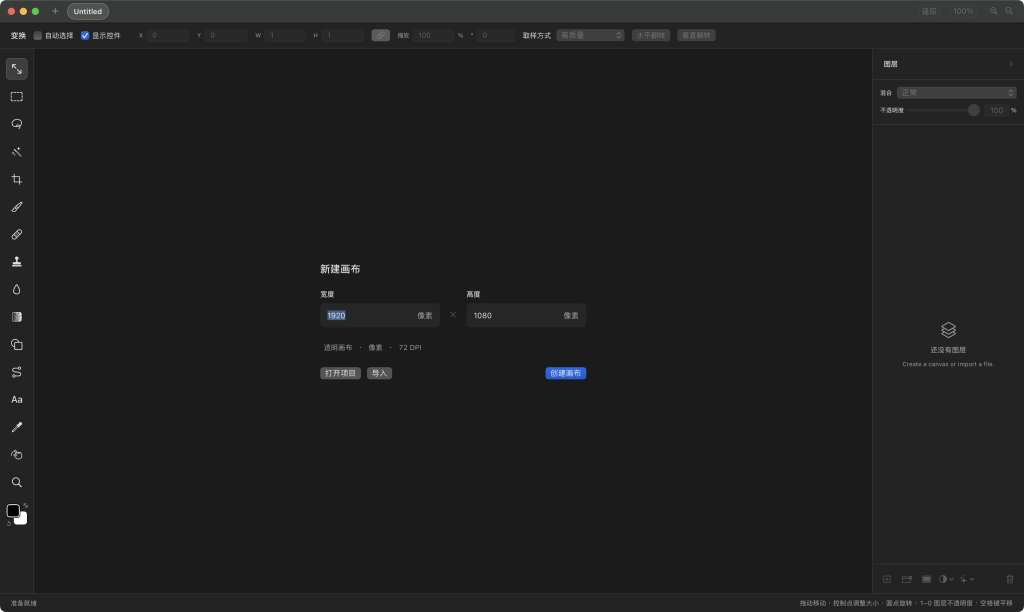 Compositor 与 Photoshop:12MB 的开源挑战者,能替代 6GB 的行业标准吗?
2026 年 9 月,前苹果、Google 设计师 Robbie Tilton 开源了图像编辑器 Compositor,直言目标是”做一个用得起、用得顺手的 Photoshop”。上线一个月,GitHub 星标破万。它和 Photoshop 到底差在哪?
出身与成本完全不同。 Photoshop 是 Adobe 的订阅制商业软件,标准版约 22.99 美元/月,安装包数 GB;Compositor 用 Swift 编写,MIT 协议,安装包仅约 12MB,免费且源码公开,你可以自己改功能、自己编译。代价是它只支持 macOS,且要求较新的系统版本。
日常修图能力,Compositor 已相当完整。 图层与文件夹、图层蒙版、剪贴蒙版、Photoshop 同序的混合模式、调整图层(曲线、色阶、色相/饱和度等)、图层效果、内容识别填充、修复画笔、仿制图章、文字工具、Camera Raw 面板,以及多标签页和 Photoshop 风格快捷键都具备,导出 PNG/JPEG,工程存为 .comp。对封面、配图、截图美化这类工作,它足够用,而且启动和响应明显更轻快。项目目前仍在快速迭代(1.6 版),更新节奏远快于商业软件的大版本周期。
Photoshop 的优势在深度与生态。 二十余年积累的选区算法、色彩管理与印刷流程(CMYK)、16/32 位深处理、PSD/PSB 复杂文件的可靠往返、海量插件与动作脚本、团队协作与云文档,以及 Generative Fill 等 AI 功能,都不是一个年轻项目短期能追平的。Compositor 对复杂 PSD 的兼容性仍有明显差距,也没有插件市场。
结论: Compositor 不是”Photoshop 杀手”,而是一个高质量的轻量替代品。偶尔修图、做封面、写文档配图的开发者,完全可以用它省下一笔订阅费;而以印刷、商业修图、团队协作为生的专业人士,Photoshop 仍是更稳妥的选择。真正的意义在于:一个设计师借助 AI 编程,用 12MB 证明了图像编辑器的核心体验,并不必然绑定 6GB 的体量与终身订阅。
How to install Compositor
- Open Terminal (press ⌘ + Space and type “Terminal”).
- If Homebrew is not installed yet, run the command below first.
- Run this command:
Latest 10 releases
Last updated 2026-11-08; current version v1.6.6, with the latest 10 releases listed.
| Version | Released | Type | Size | macOS | Windows | Linux |
|---|---|---|---|---|---|---|
| v1.6.6 | 2026-11-08 | Stable | 8.5 MB | Download | — | — |
| v1.6.5 | 2026-11-07 | Stable | 8.4 MB | Download | — | — |
| v1.6.4 | 2026-11-05 | Stable | 8.4 MB | Download | — | — |
| v1.6.3 | 2026-11-03 | Stable | 8.4 MB | Download | — | — |
| v1.6.2 | 2026-11-03 | Stable | 8.4 MB | Download | — | — |
| v1.6.1 | 2026-11-02 | Stable | 8.4 MB | Download | — | — |
| v1.6.0 | 2026-11-02 | Stable | 8.4 MB | Download | — | — |
| depth-model-1 | 2026-11-02 | Stable | — | — | — | — |
| v1.5.12 | 2026-10-27 | Stable | 8.3 MB | Download | — | — |
| v1.5.11 | 2026-10-26 | Stable | 8.2 MB | Download | — | — |
Data from GitHub Releases; stable releases first, each group sorted newest first.
Supported systems
- macOS 27(Golden Gate) (Apple silicon + Intel)
- macOS 26 Tahoe (Apple silicon + Intel)
Cannot be installed alongside: compositor。
To use both, first brew uninstall the conflicting package, or install it in an isolated environment.
Compared with similar apps
Only public metadata is compared, with no subjective recommendation; see the compare pages for field-by-field comparisons.
| App | Version | License | Architecture | 30-day installs |
|---|---|---|---|---|
| Compositor | v1.6.6 | — | Universal binary | 560 |
| OpenLogi | 0.8.18 | — | Universal binary | 3,517 |
| BasicTeX | 2026.0301 | — | Universal binary | 4,364 |
| LocalSend | v1.18.2 | — | Universal binary | 6,975 |
Similar apps: Utilities

OpenLogi
OpenLogi is a local tool for Logitech HID devices, intended as a replacement for the official…BasicTeX
BasicTeX is a compact TeX distribution suited to users who do not want to install the full TeX…LocalSend
LocalSend — a macOS app available via Homebrew.AltServer
AltServer is a desktop tool that works with AltStore, primarily used to install self-made or…LaunchOS
LaunchOS is a Launchpad replacement tool for macOS users, primarily addressing the issue of…QSpace Pro
QSpace Pro is a macOS app available via Homebrew.Categories: Utilities